App Development
January 15, 2026
9 min read
Building Offline-First Mobile Apps: Architecture and Implementation Guide
Offline capability transforms a mobile app from a convenience into a tool users can rely on anywhere. Here is how to architect and implement offline-first functionality the right way.
Users expect apps to work even when connectivity is poor or absent. Whether you are building a field service app used in basements and remote locations, a note-taking tool, or a delivery driver application, offline functionality is often the difference between a tool people trust and one they abandon when it fails them at the worst moment.
Local-First Data Storage
An offline-first architecture stores all data locally first, then syncs to the server when connectivity is available. On iOS, this means Core Data or SQLite. On Android, Room (built on SQLite). For React Native and Flutter apps, solutions like WatermelonDB or Drift provide cross-platform offline storage with excellent performance.
Conflict Resolution Is the Hard Part
The engineering challenge of offline-first is not the local storage — it is handling conflicts when data modified offline needs to be reconciled with changes made on the server while the device was disconnected. Strategies include last-write-wins (simple but lossy), merge strategies (complex but lossless), and event sourcing (most robust, highest complexity). Choose based on how critical data integrity is for your use case.
#Mobile
#Offline
#Architecture
#Sync
Business Solutions
February 28, 2026
7 min read
Digital Transformation in 2026: What It Actually Means for Small and Mid-Size Businesses
"Digital transformation" has become one of the most overused phrases in business. Here is what it actually means, what it does not mean, and how SMBs should think about it practically.
Every technology consultant, software vendor, and conference speaker has been talking about digital transformation for the past decade. The term has been applied to everything from moving spreadsheets to Google Sheets to complete reinventions of business models. For small and mid-size businesses trying to figure out where to invest, the noise is overwhelming.
What It Actually Means
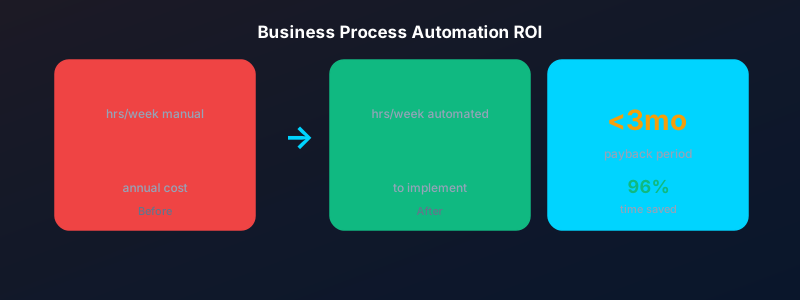
At its core, digital transformation is the process of replacing manual, paper-based, or disconnected processes with integrated digital systems that give you better data, faster operations, and more consistent outcomes. For an SMB, this might mean replacing a paper job scheduling board with a digital field service management platform, or connecting your CRM to your accounting software so you stop re-entering the same data twice.
Start With the Constraint, Not the Technology
The most common mistake in digital transformation is starting with a technology ("we need to get on the cloud") rather than a business problem ("our invoicing process takes 4 days and we frequently lose track of which clients have paid"). Always start with the constraint. Identify the process that is causing you the most pain, the most cost, or the most risk — and fix that first.
#Digital Transformation
#SMB
#Strategy
#Technology
Web Development
March 20, 2026
7 min read
Headless CMS vs Traditional CMS: Which Is Right for Your Project?
The CMS landscape has split into two fundamentally different approaches. Understanding the tradeoffs will help you choose the right architecture for your content and team.
For most of the web's history, content management systems were monolithic: they handled both the content storage and the frontend rendering. WordPress, Joomla, and Drupal follow this pattern. In recent years, headless CMS platforms — where the backend content repository is decoupled from the frontend presentation layer — have grown rapidly. Here is how to choose between them.
Traditional CMS: The Case For
WordPress powers over 40% of the web for good reason. It is mature, has an enormous plugin ecosystem, and is well understood by developers, designers, and non-technical content editors alike. For straightforward websites where content editors need to manage pages easily without developer involvement, WordPress remains an excellent choice.
Headless CMS: The Case For
A headless CMS — platforms like Contentful, Sanity, or Strapi — stores content as structured data and exposes it via API, which your frontend (built in React, Next.js, or any framework) consumes. This gives you total frontend freedom, better performance through static generation, and the ability to deliver the same content to a website, a mobile app, and any other channel simultaneously.
#CMS
#Headless
#WordPress
#Architecture
SaaS Development
April 10, 2026
8 min read
API-First Design: Why Your SaaS Platform Needs an API Strategy From Day One
APIs are not just a technical feature — they are a growth channel. Building with an API-first approach from the start opens your platform to integrations, partnerships, and a developer ecosystem.
The most successful SaaS platforms are not islands — they are hubs. Salesforce, Stripe, Twilio, and Zapier built dominant market positions in part because they designed excellent APIs that allowed thousands of other products to build on top of them. Your SaaS may not become the next Stripe, but an API strategy is still one of the highest-leverage investments you can make.
What API-First Means
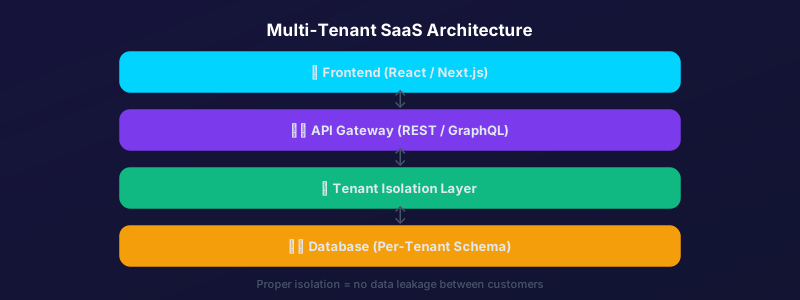
API-first design means that the API contract — the endpoints, data models, and authentication approach — is designed before the application UI. The frontend and any third-party integrations consume the same API. This approach enforces a clean separation of concerns, makes the API a first-class product, and prevents the common problem of APIs that are afterthoughts bolted onto an application not designed to support them.
The Integration Economy
In 2026, enterprise buyers evaluate SaaS products largely on integration capability. Does it connect to Salesforce? Does it have a Zapier integration? Can we connect it to our data warehouse? Platforms with strong APIs and native integrations have significantly higher win rates in enterprise sales cycles than comparable products that operate in isolation.
#API
#SaaS
#Integration
#Developer Platform
App Development
May 22, 2026
7 min read
What Makes a 5-Star App: The User Experience Principles Behind Top-Rated Mobile Apps
The difference between a 3-star and a 5-star app is rarely features. It is the quality of the experience. Here are the UX principles that consistently separate top-rated apps from average ones.
The App Store and Google Play are brutally competitive. The average app rating that drives strong organic discovery is 4.4 stars or above. The difference between a 3-star app and a 5-star app is almost never about features — it is about how the app feels to use. Here are the UX principles that separate top-rated apps from average ones.
Speed Perceived Is Speed Achieved
Users do not have accurate internal clocks — they respond to the perception of speed. Loading skeletons, optimistic UI updates, and smooth transitions make apps feel faster even when the underlying operations take the same amount of time. An app that shows a skeleton screen while loading feels faster than one that shows a blank screen followed by a sudden content pop-in.
Every Gesture Should Feel Natural
Great mobile apps are built around the idioms of their platform. On iOS, this means swipe-to-go-back, bottom sheets, and contextual menus. On Android, it means predictable back navigation and Material Design motion principles. Apps that fight platform conventions force users to think — and users who have to think give lower ratings.
Onboarding Must Deliver Value in Under 60 Seconds
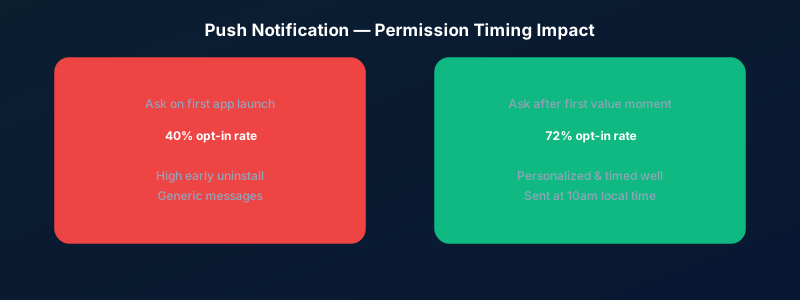
The majority of app uninstalls happen within the first session. If a new user cannot understand what your app does and experience at least one moment of value within the first 60 seconds, most of them will not come back. Progressive onboarding — teaching features at the moment they are relevant rather than upfront — consistently outperforms tutorial-heavy first-run experiences.
#UX
#Mobile Design
#App Store
#User Experience