Blog & Insights

Expert perspectives on web development, mobile apps, SaaS, and business technology from the Wealth Profusion team

Multi-Tenancy Explained: How to Architect a SaaS Platform That Scales

Multi-Tenancy Explained: How to Architect a SaaS Platform That Scales

Multi-tenancy is the foundation of every scalable SaaS product. Understanding how to architect it correctly from the start will save you from a painful and expensive rebuild later.

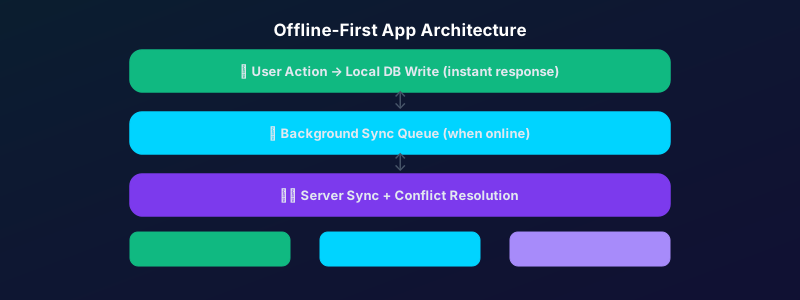
Multi-tenancy — the ability for a single instance of your software to serve multiple customers, with each customer's data fully isolated from the others — is the defining characteristic of SaaS architecture. Getting it right from the start is critical. Retrofitting multi-tenancy into an application that was not designed for it is one of the most painful engineering projects a team can undertake.

The Three Tenancy Models

There are three common approaches: shared database with a tenant identifier column (simplest, lowest cost, some isolation risk), separate schemas within a shared database (good balance of isolation and cost), and separate databases per tenant (maximum isolation, highest cost, usually only justified for enterprise customers with strict compliance requirements). Most SaaS products start with the shared database model and move to separate schemas as they scale.

What Tenant Isolation Actually Means

Isolation means Tenant A can never see, access, or accidentally receive data belonging to Tenant B. This needs to be enforced at every layer: the database query level, the API level, and the frontend rendering level. A single missing tenant_id filter in a database query is a data breach waiting to happen.

Push Notifications Done Right: How to Engage Without Annoying

Push Notifications Done Right: How to Engage Without Annoying

Push notifications are one of the most powerful tools in a mobile app — and one of the most frequently abused. Here is how to use them to drive engagement rather than uninstalls.

The average smartphone user receives 46 push notifications per day. Most of them are ignored. Many cause uninstalls. But when push notifications are done correctly — timed well, relevant, and personalized — they are the single most effective re-engagement tool available to a mobile app.

The Permission Moment Is Everything

iOS requires explicit permission for push notifications. Most apps ask for this permission immediately on launch, before the user has experienced any value. This is the worst possible time to ask. The opt-in rate for notification permission requests made on first launch is around 40%. For apps that wait until the user has completed a meaningful action before asking, it is over 70%.

Segment, Personalize, Time

Generic broadcast notifications ("Check out our new features!") perform an order of magnitude worse than segmented, personalized ones. The best push notifications reference something specific to the user — their activity, their progress, an action they left incomplete. And timing matters: notifications sent at 10am local time consistently outperform those sent at other times.

Cloud Migration Mistakes That Cost Companies Millions (And How to Avoid Them)

Cloud Migration Mistakes That Cost Companies Millions (And How to Avoid Them)

Cloud migration promises lower costs and greater flexibility — but poorly planned migrations regularly deliver the opposite. Here are the most expensive mistakes companies make and how to avoid every one of them.

Cloud migration is one of those initiatives that sounds straightforward until you are in the middle of it. Organizations that rush into migration without proper planning routinely end up with cloud bills higher than their on-premise costs, applications that perform worse than before, and security configurations that introduce new vulnerabilities. Here is what separates successful migrations from expensive disasters.

Mistake 1: Lift-and-Shift Without Optimization

Moving your existing on-premise workloads to the cloud without any re-architecture — a "lift and shift" approach — is the fastest migration method but often the most expensive to operate. Applications designed for on-premise infrastructure frequently make inefficient use of cloud resources. Before migrating, identify which workloads can be modernized during the migration rather than after.

Mistake 2: No Cost Governance From Day One

Cloud costs are elastic — they can grow without bound if not actively managed. Organizations that migrate without setting up budgets, cost alerts, and resource tagging from day one often discover unexpected five or six-figure monthly bills. Implement cloud cost management tooling before your first production workload goes live.

Why Your Business Website Is Losing You Customers (And How to Fix It)

Why Your Business Website Is Losing You Customers (And How to Fix It)

Most business websites fail at the one job they were built to do — convert visitors into customers. Slow load times, unclear messaging, and broken mobile experiences are quietly costing you revenue every single day.

Your website is your most important salesperson — it works 24 hours a day, seven days a week, and never calls in sick. Yet most business websites are quietly failing. Visitors land, look around for a few seconds, and leave. No inquiry. No sale. Just a bounce.

The good news? Most of these problems are fixable. Here are the four most common reasons your website is losing you customers.

1. It Takes More Than 3 Seconds to Load

According to Google, 53% of mobile users abandon a site that takes longer than three seconds to load. If your page speed score is below 70, you are losing more than half your mobile visitors before they even see your content. Image compression, caching, and minified CSS/JS alone can cut load times in half.

2. Your Value Proposition Is Buried

A visitor should understand exactly what you do and who you do it for within the first five seconds of landing on your homepage. If your hero section opens with "Welcome to our website" or a vague tagline, you have already lost them. Lead with your clearest, most specific value statement.

3. It Is Not Built for Mobile

Over 60% of global web traffic comes from mobile devices. A responsive layout is not optional — it is the baseline. But true mobile optimization goes beyond making things fit on a smaller screen. Touch targets, font sizes, and form inputs all need to be specifically designed for thumbs, not cursors.

4. There Is No Clear Next Step

Every page on your website should have one clear call to action. Not three. Not a footer menu and a contact form and a chat widget competing for attention. One primary action you want the visitor to take. Make it visible, make it compelling, and make it easy.

Subscription Billing Models: Choosing the Right Pricing Strategy for Your SaaS

Subscription Billing Models: Choosing the Right Pricing Strategy for Your SaaS

How you price your SaaS is as important as what it does. The right billing model directly affects your MRR growth rate, churn, and the type of customers you attract.

Pricing is product. The billing model you choose shapes the relationship you have with your customers, the incentives they have to expand usage, and the revenue predictability of your business. Getting it wrong is costly — switching billing models after launch disrupts your existing customer base and requires significant engineering work.

Per-Seat Pricing

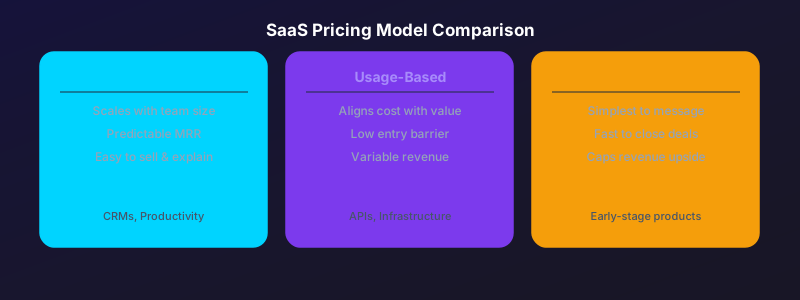
Charging per user is simple, predictable, and easy to sell. It scales naturally with the value delivered as companies grow and add more team members. The downside: customers are incentivized to minimize seats, and usage caps can cause frustration. Best for: collaboration tools, CRMs, project management software.

Usage-Based Pricing

Charging based on consumption — API calls, records processed, emails sent — aligns cost perfectly with value. Customers love it because they only pay for what they use. The downside: revenue is less predictable and customers may optimize usage in ways that reduce your revenue. Best for: API products, infrastructure tools, communication platforms.

Flat-Rate Subscription

A single monthly price for access to the full product is the simplest model to communicate and sell. The downside: you leave money on the table from power users who would happily pay more. Best for: early-stage products trying to acquire customers quickly, or tools with a very homogeneous user base.

Showing posts 6–10 of 15